
Ozon fresh
Internet Solutions LLCFood & Drink
4.25.00 Reviews
- Version
- 19.32.0
- Installs
- 100.00K
- Age Rating
- Teen
Screenshots
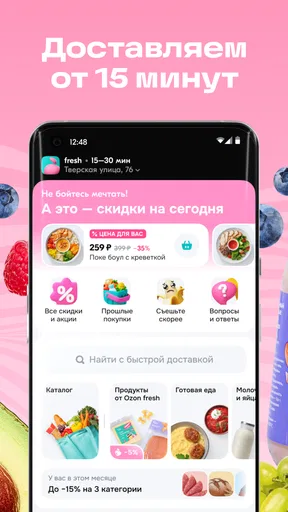

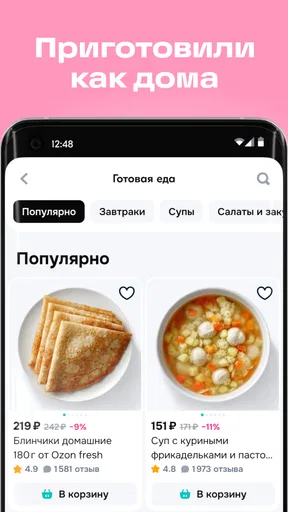



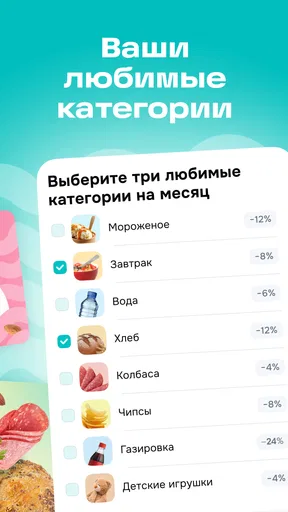
Our Review of Ozon fresh
 Analysis by Appyee
I approached Ozon fresh as a practical grocery app rather than something I would open for browsing alone. Its promise is straightforward: help me choose groceries, baked goods, and ready-made meals from a phone, then arrange delivery quickly. That makes it most interesting on busy weekdays, when the problem is not finding a recipe but getting food into the kitchen without another trip outside.
The app is free to install and belongs to the Food & Drink category. It comes from Internet Solutions LLC, carries a Teen content rating, and has reached over 100 thousand installs. Its current version is 19.32.0, and it works on devices running Android 8.0 or later. Those details matter to a first-time user because this is not a specialist restaurant app or a recipe collection: it is designed around ordering everyday food and prepared options.
After spending time with it, my overall impression is positive but practical. The strongest part is the way it can turn a vague need—“I need dinner and a few basics”—into a manageable order. The weaker part is that fast delivery can make people shop impulsively, and a phone screen is not always the best place to compare every option in a large grocery basket. I would recommend it to someone who values convenience and nearby availability, while a traditional supermarket remains better for a major, carefully planned shop.
What the first order feels like
The first thing I would tell a new user is to think locally. The useful experience depends on what can be delivered to the selected address, so the app is not simply a universal catalogue where every item is equally relevant everywhere. Before getting attached to a particular meal or bakery item, I would set the destination and then explore what is actually available for that location.
That order of operations saves time. Many grocery apps encourage people to fill a basket first and think about delivery afterward. Here, the idea of speed makes the address especially important. A product that looks perfect in a search result is not helpful if it does not fit the delivery area or timing shown for the current order. I found it more sensible to treat the app as a local shopping window: first establish where the basket is going, then decide what deserves a place in it.
The range is also broader than a simple takeaway menu. Groceries cover the items I might normally add to a small supermarket trip, while baked goods and ready-made meals address the immediate need for something to eat. That combination is the app’s clearest identity. I can use it for a forgotten breakfast ingredient, a quick lunch, or a mixed order that combines staples with food that needs no cooking.
The most useful mindset is to separate urgent food from planned food. If I need dinner tonight, ready-made meals should be judged by convenience and suitability. If I am restocking the kitchen, I need to slow down and check quantities, pack sizes, and substitutions or alternatives shown during the ordering process. The same app serves both purposes, but the decision-making is different.
Who will get the most from it
I see the best fit in people with uneven schedules: someone finishing work late, a parent who cannot easily leave home, a student preparing food between commitments, or a household that has run out of a few essentials. It is also useful when weather, fatigue, or a temporary mobility problem makes a supermarket visit disproportionately difficult.
It is less compelling for a large weekly shop where the main goal is the lowest possible total. A physical supermarket can make it easier to compare brands, inspect package sizes, and notice alternatives while walking through the aisles. Ozon fresh is better when saved time has real value. If I am ordering only because browsing is easier than deciding, the convenience can become an expensive habit.
What to do immediately after installing
My recommendation is not to begin by searching for one particular snack. First, let the app establish the delivery context and look at the available categories. This gives a more accurate sense of what the service is for in your area. I would then choose a simple first task, such as building a small meal around one ready-made item and two or three grocery additions.
A small basket is a better test than a large one. It lets me understand the product cards, the basket summary, the delivery information, and the final confirmation flow without turning the first attempt into a complicated household inventory. It also makes it easier to notice whether the selection suits my habits. If the available prepared food looks appealing but the grocery range is not useful to me, I know I should treat the app as an occasional meal solution rather than a complete replacement for shopping.
The app has an average rating of 4.2 from around 830 ratings, which suggests that many users find the basic idea worthwhile while experiences are not identical for everyone. I would read that as encouragement to try it with a realistic order, not as a guarantee that every delivery will suit every address or schedule.
From setup to a meaningful first success
I’d treat the first order as a small, practical experiment rather than a full grocery run: choose one meal, add only what completes it, and check that the basket matches your plan before confirming. That gives you a clearer sense of whether the local selection and delivery timing fit your routine. Once that first order feels manageable, the next useful question is how to build baskets without letting speed turn into impulse shopping.
Make the first basket deliberately small
For a first meaningful action, I would choose one clear objective: solve one meal. For example, I might select a ready-made main dish, add a drink or side, and include one ordinary grocery item I already know I will use. This is more informative than filling the basket with random products. It tests whether the app can help with a real decision, whether the selection is understandable, and whether the delivery timing works for the moment I need it.
Once the basket is assembled, I would pause before confirming. Check the quantity of every item, especially when adding products from search results rather than from a familiar supermarket shelf. On a phone, it is easy to tap an item twice or overlook that a product is sold in a different size from the one I had in mind. This is a small habit, but it prevents the most avoidable first-order mistake: receiving something technically correct but practically wrong for the meal.
I would also review the basket as a plan, not merely as a list. Does the prepared dish need anything else? Is there enough food for the people who will eat it? Did I accidentally choose several convenience items while forgetting the one basic ingredient that prompted the order? The app can shorten the shopping process, but it cannot replace that final human check.
Use categories for planning and search for recovery
Browsing categories works well when I am open to ideas. It is a calmer way to discover baked goods or ready-made meals than typing a vague search term and scrolling through unrelated results. When I already know exactly what I need, search is more efficient. I would use categories to design a meal and search to recover a missing staple.
That distinction is a useful workflow. Start with the meal or occasion, then use targeted search for the gaps. For a breakfast order, I might browse baked goods first and then search for a drink or pantry item. For a rushed dinner, I would begin with ready-made meals and only afterward add groceries that make the order feel complete. This prevents the catalogue from dictating the entire purchase.
Another practical tip is to avoid building the basket while distracted. Fast delivery encourages quick decisions, but grocery mistakes often come from attention rather than from the app itself. I would keep the final review focused on three things: what will be eaten first, what is a basic restock, and what was added merely because it looked convenient.
Understand the difference between speed and certainty
The service is built around delivery from as little as 15 minutes, which is attractive when lunch is already late or unexpected guests are arriving. I would still treat that time as an estimate for the current order context rather than as a reason to postpone every other kind of planning. The faster the need, the more important it becomes to select familiar items and keep the basket uncomplicated.
For a time-sensitive order, I would avoid experimenting with a completely unknown meal, building a large mixed basket, or waiting until the last possible moment. Choose items whose role is clear, confirm the address and basket, and leave enough breathing room for ordinary disruption. The app’s value is greatest when it removes a trip to the store, not when I use it to create a second round of urgent decisions.
For planned use, I would do the opposite. Browse earlier, compare the available choices, and use the basket as a short list rather than a panic button. This is where the app can become part of a routine: a small top-up order when the kitchen is missing a few things, rather than a replacement for all forms of food planning.
Where new users may hesitate
The first likely confusion is the relationship between availability and location. A product catalogue can feel definitive, but local delivery services are shaped by the selected destination. If a familiar item is not visible or cannot be ordered, I would first check the delivery context and then try a broader search or a nearby alternative. I would not assume that the absence of one brand means the whole category is unavailable.
The second point is the mixed nature of the catalogue. Groceries, bakery products, and prepared meals do not have the same buying logic. A ready-made dish is judged by when it will be eaten; a pantry item is judged by usefulness and quantity; a baked item may be chosen for freshness or occasion. Keeping those purposes separate makes the app feel less cluttered and makes the final basket easier to evaluate.
The third is the temptation to confuse a short delivery promise with a complete shopping solution. A rapid order is excellent for a forgotten ingredient or immediate meal. It is not automatically the best tool for comparing a full household shop, planning several days of meals, or controlling every purchase with the discipline of a written list. I would use it as a flexible layer between cooking, takeaway, and supermarket shopping.
When another option makes more sense
If I want restaurant-specific food, I would normally choose an app focused on takeaway because its menus, customization, and restaurant discovery are built for that purpose. If I want the broadest possible supermarket comparison, I would favor a conventional grocery service or a physical store. Ozon fresh sits in the useful middle: it combines everyday groceries with baked goods and ready-to-eat food, making it convenient when I want one practical order instead of deciding between several separate services.
That middle ground is also its trade-off. It may be easier to solve dinner and a small restock together, but it may not give the same depth of choice as a specialist in either restaurant food or large-scale grocery shopping. I would choose it when simplicity matters more than exhaustive comparison.
My final recommendation for a first-time user
I would start with a modest order, set the delivery destination before browsing, and choose a meal that can be evaluated clearly. Review the quantities, check the basket as a complete plan, and use the speed as a convenience rather than a challenge. After that first successful order, the app becomes easier to judge: you will know whether its local selection fits your diet, whether its ready-made food suits your routine, and whether the grocery range is strong enough for repeat use.
Ozon fresh is a free Food & Drink app with a clear everyday purpose, and the developer Internet Solutions LLC has packaged that purpose around quick access to food rather than elaborate planning tools. I like it most for small, time-sensitive orders and mixed baskets that combine a prepared meal with a few essentials. I would skip it for a carefully optimized bulk shop or for restaurant-style ordering where specialized alternatives are stronger.
My honest conclusion is that Ozon fresh works best when it saves a real trip, not when it encourages another impulse purchase. Used with a short list and a final basket check, it can be a reassuring first step for someone who needs food delivered without turning the process into a project. Its rating of 4.2 and community of roughly 830 ratings make it worth trying, but the real test is personal: install it, set your location, solve one ordinary meal, and then decide whether that convenience deserves a place in your weekly routine.
Verdict
Strengths of Ozon fresh
- Wide selection of groceries, household items, and everyday essentials
- Convenient scheduled delivery options in supported areas
- Clear product photos and descriptions make browsing easier
- Frequent discounts and promotional offers can reduce order costs
- Order tracking helps you monitor delivery progress in real time
Limitations of Ozon fresh
- Availability and delivery times vary significantly by location
- Fresh produce quality may differ between individual orders
- Minimum order values or delivery fees may apply
- Some popular products can sell out quickly
- Refunds or replacements for missing items may take time
Other Releases by Internet Solutions LLC
View All
OZON: товары, одежда, билеты
Shopping3.7
Similar Picks in This Category
View All
Rappi: Food Delivery, Grocery
Rappi, Inc - Delivery3.5

McDonald’s: Cupons e Delivery
Arcos Dorados4.3

Swiggy: Food Instamart Dineout
Swiggy4.7

Blinkit: Groceries & more
Blinkit4.8

foodpanda: food & groceries
Foodpanda GmbH a subsidiary of Delivery Hero SE4.0

Zomato: Food Delivery & Dining
Zomato4.7
Frequently Asked Questions
What is Ozon fresh, and what can I order through the app?
Ozon fresh is an online grocery delivery service focused on everyday food, household essentials, drinks, personal-care products, and other items that are convenient to receive at home. The app lets you browse categories, search for products, compare prices, add items to a cart, choose an available delivery window, and track the order. Product selection and service availability can vary by city and delivery address.
How does delivery work, and can I choose a delivery time?
After entering your address, Ozon fresh shows the delivery options available for your location, including estimated arrival times and, where supported, scheduled time slots. In some areas, delivery may be available on the same day or within a relatively short period, while other locations may have fewer options. Always check the final delivery fee, minimum order requirements, and time window before confirming your purchase.
Are the groceries fresh, and how are chilled or frozen products handled?
Ozon fresh is designed to deliver groceries and other products in suitable condition, but the experience can depend on the warehouse, courier route, weather, and selected delivery option. Chilled and frozen goods are generally packed with attention to temperature-sensitive handling, although availability may differ by location. When receiving an order, inspect packaging, seals, expiration dates, and product condition, and report any issue through the app as soon as possible.
How can I pay for an Ozon fresh order, and are there extra charges?
Payment methods depend on your country, account, and the options enabled for your delivery address. The app normally displays the available methods during checkout, along with the product subtotal, delivery cost, discounts, and any applicable service or minimum-order charges. Before placing the order, review the complete total carefully. Promotions, loyalty benefits, and delivery fees may change, so an offer shown on one order may not apply to another.
What should I do if an item is missing, damaged, substituted, or not as expected?
If your order contains a missing, damaged, incorrect, or poor-quality item, open the order details in the Ozon fresh app and use the support or issue-reporting option. Provide a clear description and, when requested, photographs of the product, packaging, receipt, or delivery label. Resolution options can include a refund, replacement, or another support decision, depending on the circumstances and the applicable return and food-safety rules.
